The Captive Portal Login Explained A Modern Guide

Ever found yourself in a hotel or coffee shop, trying to get online, only to be stopped by a login page before you can start browsing? That's a captive portal login. It’s the digital equivalent of a front desk for a Wi-Fi network—before you get full access, you have to 'check in'.
Your First Encounter With A Captive Portal
Picture this: you've just arrived at your hotel after a long journey. You open your laptop, connect to the hotel's Wi-Fi, and expect to jump straight into your emails. Instead, you're greeted by a page with the hotel's logo, asking for your room number and surname. This little interruption is the captive portal in action.
Its main job is straightforward: to manage who gets onto the network. It does this by creating a temporary, walled-off garden for any new device. While you're in this "captive" state, the only place your device can go is that specific login page. The network basically holds your internet connection hostage until you've done what it asks.
The Digital Doorman Analogy
A great way to think about a captive portal is like a friendly but firm doorman at an exclusive club—in this case, the internet.
- Initial Connection: You show up at the club's entrance (connecting to the Wi-Fi).
- The Interception: The doorman politely stops you before you can walk in (your traffic is intercepted).
- Authentication: You show your invitation or ID (you enter your login details or agree to the terms).
- Access Granted: The doorman unhooks the velvet rope, and you're free to go inside (you now have full internet access).
This process makes sure only authorised users get online, letting the venue decide who connects, for how long, and on what terms. It's a fundamental tool for any business offering guest or public Wi-Fi.
A captive portal isn't just about security; it's a critical touchpoint for guest engagement and communication. It transforms a simple connection into an opportunity to present branding, share offers, or communicate important terms of service directly to the user at the moment of connection.
This controlled gateway is everywhere in public spaces. In the UK, for instance, the captive portal market has grown massively alongside the rise of public Wi-Fi in hospitality. After GDPR came into effect, UK hotels saw a 35% increase in guest Wi-Fi logins. But it's not all smooth sailing; 22% of UK users will simply give up if the login process is too clunky. You can discover more insights about the captive portal market growth and its challenges here. This shows just how tricky it is to balance network control with a smooth user experience, which is exactly why modern alternatives are gaining so much traction.
How A Captive Portal Login Actually Works
So, what’s happening behind the scenes when you hit that captive portal? Let's go back to our digital doorman analogy. The moment you connect to a new Wi-Fi network, your device—whether it's your phone, tablet, or laptop—instinctively tries to reach out to the wider internet. Maybe it's checking for new emails, fetching a push notification, or just verifying it has a connection.
But the network's gateway, our digital doorman, has other plans.
It intercepts that very first request. Instead of letting your device's signal travel out to the internet, the gateway grabs it and reroutes you to a local webpage hosted on the network itself: the captive portal login page. This is the core trick, a clever bit of network redirection that uses DNS and HTTP to ensure that no matter what site you try to visit first, you land on the authentication screen.
You are, quite literally, held captive until you give the doorman the password.
This infographic breaks down the simple but powerful three-step journey every user takes when they first connect.
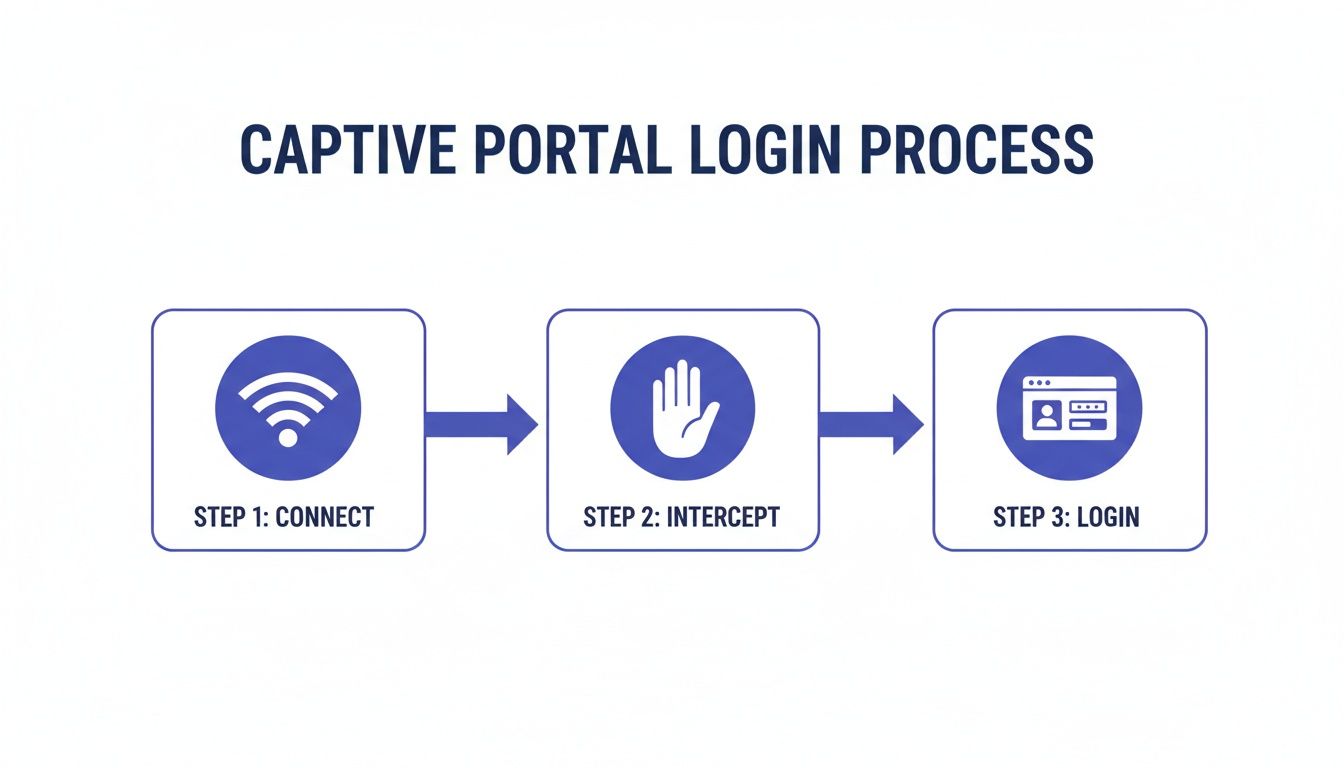
As you can see, that middle step—the interception—is the critical link between a user joining the network and being allowed to actually use it.
The Moment of Authentication: How You Get In
Once you're staring at that login page, the system needs a way to confirm who you are. This is where different authentication methods come into play, and the one a business chooses says a lot about its goals. Is the priority a quick, frictionless experience? Or is it about collecting marketing data or ensuring top-tier security?
Each method serves a different purpose, creating a distinct user journey. You've almost certainly encountered most of them.
Comparing Common Captive Portal Authentication Methods
Choosing the right way to let users onto your network is a balancing act. You have to weigh user convenience against your business objectives, like security and data gathering. Below is a practical breakdown of the most common methods you'll find in the wild.
These methods show there's no single "best" way to authenticate users. The right choice always comes down to the specific needs of the venue and the expectations of its users. A coffee shop doesn't need the same level of security as a corporate headquarters.
Enterprise-Grade Authentication: Beyond a Simple Login
While the methods above are perfect for guest networks, corporate or high-security environments demand something more robust. Here, the goal isn't just to let people online; it's to verify that only authorised individuals get access, often integrating directly with a company's internal IT systems.
Authentication isn't just a gate; it's an identity check. The strength of that check must match the value of what's behind the gate. For an enterprise network, that means moving beyond simple codes to methods that integrate with trusted identity sources.
One of the most established and reliable methods is RADIUS (Remote Authentication Dial-In User Service). Think of a RADIUS server as a centralised bouncer for your network. When a user types their credentials into the portal, the request is passed to the RADIUS server. It then checks that information against a central user directory, like Active Directory, to confirm the user's identity and grant access based on pre-set rules.
An even more modern and user-friendly approach is Single Sign-On (SSO). This is a game-changer for employee experience. It lets staff use the same login they already use for everything else—like their Microsoft 365 or Google Workspace account. It’s a win-win: employees get online without having to remember yet another password, and IT gets to manage network access from a single, secure platform.
The Hidden Security And Privacy Risks You Face
While a captive portal login feels like a standard part of connecting to public Wi-Fi, this digital gateway can also be a weak point, exposing both businesses and their customers to some serious security and privacy threats. The very mechanism that redirects you to a login page can be exploited by attackers, turning a moment of convenience into a major vulnerability.
Imagine you're at a busy airport, eager to get online. You see two Wi-Fi networks: "Airport_Free_WiFi" and "Airport_Free_Wi-Fi". They look identical, but one is a trap. This is the classic "evil twin" attack, and it’s one of the most common threats associated with captive portals.
An attacker simply sets up a rogue Wi-Fi hotspot with a name that mimics the legitimate one. When you connect, their malicious portal—a perfect copy of the real thing—captures any information you enter, from your email address to passwords or personal details. You think you’re logging in, but you’re actually handing your credentials directly to a cybercriminal.

Unencrypted Connections And Data Interception
Even on a legitimate network, the risks don't just disappear, especially if the connection isn't properly secured. Plenty of older or poorly configured captive portals still operate over an unencrypted HTTP connection. This means the data you send between your device and the portal is transmitted in plain text.
Anyone on the same network with basic hacking tools can pull off a man-in-the-middle (MitM) attack. They can intercept, read, and even alter the information flowing between you and the Wi-Fi hotspot. This includes login credentials, personal information entered into forms, and the websites you visit immediately after connecting.
Recent data shows just how serious this has become in the UK. Man-in-the-middle attacks have surged by 28% on public Wi-Fi networks in recent years. In retail, a staggering 34% of shopping centres reported unauthorised access attempts via fake portals, compromising an estimated 750,000 user credentials. The hospitality sector isn't immune either; 19% of guest logins in UK hotels were found to be vulnerable to this kind of data interception. Read the full research about these captive portal security trends.
The Privacy Problem With Data Collection
Beyond active security threats, captive portals create significant privacy challenges. To get access, users are often asked to hand over personal data—a name, email address, phone number, or even access to their social media profiles. While this information is valuable for marketing, it also creates a heavy responsibility for the business collecting it.
Under regulations like the General Data Protection Regulation (GDPR) in the UK and Europe, organisations must be completely transparent about what data they collect, why they need it, and how they plan to use it.
A captive portal isn't just a network tool; it's a data collection point. If you ask for user data, you are legally obligated to protect it. Failing to do so can result in severe financial penalties and serious damage to your brand's reputation.
This places a huge burden on businesses to ensure their captive portal login process is compliant. Key considerations include:
- Explicit Consent: Users must actively and clearly agree to their data being collected. Pre-ticked boxes just don't cut it anymore.
- Clear Privacy Policy: You must provide an easily accessible privacy policy that explains data handling practices in simple, straightforward terms.
- Data Minimisation: Only collect the data you absolutely need for the service you're providing.
- Secure Storage: The collected data must be stored securely to prevent breaches.
The challenge is that many basic captive portal systems lack the features needed to manage these compliance requirements effectively. This leaves businesses exposed to legal risks and erodes trust with their customers. Protecting this data is paramount, and it requires a deep understanding of your obligations. You can learn more about data and security best practices to ensure your network is fully compliant and secure.
The combination of these security and privacy risks is exactly why the industry is moving towards more modern, inherently secure access methods that protect users from the moment they connect.
The Shift Beyond Traditional Portal Logins
That familiar routine of finding a Wi-Fi network and hitting a login page is slowly becoming a thing of the past. While captive portals have been the digital gatekeepers for public networks for years, their cracks are starting to show. Issues with security, user experience, and clunky management have paved the way for a new generation of access technologies. The industry is definitely moving towards a future that’s more secure, seamless, and automated.
This isn't just a minor software update; it’s a complete rethink of how we connect to wireless networks. The main goal is to get rid of the friction and weak spots that are part of the traditional login process. Instead of having to type details into a webpage, modern solutions work behind the scenes to get your devices authenticated automatically and securely, right from the moment you're in range.
The Rise of Seamless Roaming
Imagine your phone connecting to a Wi-Fi network with the same effortless security it uses for a cellular network—no login pages, no passwords, just instant, trusted access. This is exactly what technologies like Passpoint (also known as Hotspot 2.0) and the OpenRoaming framework are delivering. Think of them as a universal Wi-Fi passport for your devices.
Once a user sets up their device for an OpenRoaming or Passpoint-enabled network, their credentials are securely tucked away. From then on, their device will automatically and securely connect to any participating network anywhere in the world.
Passpoint (Hotspot 2.0): This is the core Wi-Fi Alliance protocol that handles all the automatic network discovery and login work. It uses strong, enterprise-grade WPA2/WPA3 encryption, creating a secure tunnel from the very first data packet and shutting down the risk of "evil twin" attacks.
OpenRoaming: Built on top of Passpoint, this is a global federation of networks. It allows someone who authenticates on one member network (like your local coffee shop) to roam seamlessly onto any other member network (like an airport or hotel) without ever having to log in again.
The big idea behind these technologies is to make secure Wi-Fi access as simple and widespread as cellular roaming. By moving the authentication process from a web browser to the device itself, they eliminate the weakest links in the chain—the user and the unencrypted portal page.
Advanced Access for Corporate Environments
This move towards seamless access isn't just for public guest networks; it’s happening in the corporate world, too. For employees, IT teams, and managed devices, the need for both tight security and total simplicity has pushed businesses to adopt stronger authentication methods that plug directly into their identity systems.
One of the most effective approaches is certificate-based authentication. Instead of a password, a unique digital certificate gets installed on each company-owned device. When a user tries to connect, the network checks this certificate against an identity provider like Microsoft Entra ID, Okta, or Google Workspace. It’s a zero-trust security model that requires zero user interaction.
Another clever innovation is Individual Pre-Shared Keys (iPSK), sometimes called Private PSK. This is perfect for devices that can't handle complex authentication, like IoT hardware (smart thermostats, security cameras) or older equipment. Each device gets its own unique Wi-Fi password, which can be easily managed and revoked without disrupting any other device on the network. It blends the simplicity of a pre-shared key with the security of individual accountability—a massive step up from having one shared password for everyone.
As device manufacturers increasingly phase out legacy Wi-Fi login methods, these new approaches are becoming non-negotiable. You can learn more about the death of the captive portal and what it means for businesses.
How Modern Platforms Reinvent The Wi-Fi Login
The old captive portal login, with all its security headaches and clunky user flows, is finally on its way out. It’s being replaced by intelligent, identity-based networking platforms that are fundamentally changing the game. Solutions like Purple address the core pain points of those legacy systems, shifting away from a clunky model of interception and redirection to one of automated, trusted authentication. This isn't just an incremental upgrade; it's a complete reimagining of what a network’s digital front door should be.
Instead of treating every single connection as a potential threat that needs a manual login, these modern platforms establish trust right from the very first interaction. They create a secure, seamless, and far more sophisticated welcome for anyone walking into your venue.

For Guests: A Passwordless Welcome
For your guests, the biggest and most welcome change is that the login page simply vanishes. By using technologies like Passpoint and OpenRoaming, modern platforms deliver a true "connect and go" experience.
A guest only has to authenticate once. The next time they visit—or when they walk into any of the thousands of other locations in the roaming network—their device just connects, automatically and securely. It works a lot like your mobile phone connecting to a cellular network; it just happens, no action required. This approach also completely sidesteps the risk of man-in-the-middle attacks. You can dive deeper into how seamless Wi-Fi eliminates common security threats in our detailed guide.
A modern Wi-Fi platform transforms network access from a recurring chore into a one-time, secure handshake. The best login experience is the one the user never has to see.
This also tackles privacy concerns head-on. In the UK, data privacy laws like GDPR have completely reshaped how portals can be used, demanding clear and unambiguous consent. While UK retail marketing teams once saw 42% higher engagement rates after putting in a portal, growing privacy fears caused a 15% dip in adoption as users worried about data breaches. Platforms like Purple not only ensure full compliance but also turn that first-party data into ROI-proven insights, such as a 22% increase in visits for hospitality clients.
For Staff: Zero-Trust, Enterprise-Grade Access
For your own employees and corporate users, modern platforms do away with the hassle of on-site RADIUS servers and the security nightmare of shared passwords. Instead, they plug directly into cloud-based identity providers you already use.
This makes it incredibly simple for organisations to implement a zero-trust security model.
- SSO Integration: Platforms connect with Microsoft Entra ID, Google Workspace, and Okta. Staff just use their normal company credentials for Single Sign-On (SSO), making access a breeze.
- Certificate-Based Authentication: For company-owned devices, unique digital certificates are automatically handed out. This grants access based on a trusted device identity, not just a password that can be phished or stolen.
- Individual PSK (iPSK): Even those tricky legacy and IoT devices that can't handle advanced authentication can be locked down. Each device gets its own unique password that can be revoked in a second without disrupting anything else.
Because it's all managed from the cloud, when an employee leaves the company, their network access is cut off the moment they're removed from the central directory. This shuts down a huge security hole found in many traditional networks, bringing enterprise-grade security with consumer-level simplicity to every sector, from hospitality and retail to healthcare.
Your Checklist For Modern Network Access
Moving on from a traditional captive portal login to a modern, identity-based network isn't something you do on a whim. It requires a bit of careful planning. This practical checklist is your roadmap, designed to guide IT admins and business owners through the key stages of upgrading network access for everyone – guests, staff, and all those connected devices.
1. Define Your Access Policies
Before you touch any technology, the first step is to figure out who needs access and what kind of access they should get. It’s a classic mistake to treat every user the same.
- Guest Access: What’s the main goal here? Is it purely for customer convenience, a way to gather marketing data, or a premium paid-for service? Your answer will point you towards either a seamless OpenRoaming experience or a captive portal with a compliant data capture form.
- Employee Access: How should your team connect? Corporate-owned devices ought to have zero-touch access using certificates, while their personal devices might be better suited to using SSO credentials they already know.
- IoT and Legacy Devices: This is the tricky one. How will you securely connect devices like printers, smart TVs, or building sensors that can't handle complex logins? This is exactly where Individual Pre-Shared Keys (iPSK) become essential.
2. Evaluate Your Infrastructure and Integrations
Your existing hardware and software are going to play a massive part in your migration plan. A thorough audit isn't just a good idea; it's a non-negotiable first step.
A modern access solution shouldn't force you into a complete hardware overhaul. It should work with what you've already got, integrating with your existing network infrastructure and identity systems to act as an intelligent layer that makes everything better.
Start by checking for compatibility with your current Wi-Fi access points, whether they're from vendors like Meraki, Aruba, or UniFi. Just as importantly, you need to identify your main identity provider. Is it Microsoft Entra ID, Google Workspace, or Okta? Your new system must plug into this central source of truth to automate who gets access and who doesn’t.
3. Design The User Onboarding Experience
The way users first connect to the network sets the tone for their entire experience. A confusing or long-winded process will completely undermine all the benefits of the upgrade.
- For Passpoint/OpenRoaming: Make sure you have clear instructions ready for the one-time setup. A simple QR code or a link to a configuration profile can turn this into a process that takes just a few seconds.
- For SSO and Certificate-Based Access: For employees, this should be totally invisible. The goal is for them to select the corporate SSID and for it to just work – no portals, no passwords, no fuss.
4. Plan for Security and Compliance
Finally, make absolutely sure your new system tightens up your security and meets all the necessary regulations. This means verifying that every connection is encrypted from the get-go using WPA2/WPA3-Enterprise. If you're collecting any data, confirm that your platform has clear consent mechanisms and privacy policies that are fully aligned with GDPR. By making security and compliance a core part of the plan, you build a network that isn't just easy to use, but is also trustworthy and resilient.
Frequently Asked Questions
When you're dealing with network access, questions are bound to come up, especially when trying to strike the right balance between a great user experience and solid security. Here are some straightforward answers to the most common queries we hear about captive portals and their more modern alternatives.
Can Users Bypass A Captive Portal Login?
The short answer is: not on a well-configured network. While you might read about technical tricks like MAC spoofing, any modern firewall or intelligent access point is built to shut these down. It's standard practice to funnel all traffic through the portal until a user has properly authenticated.
For any business, making sure your system actually enforces the login is vital for network security, data integrity, and compliance. And for users, the path of least resistance is almost always just to go through the login process as intended.
Is It Safe To Enter My Information On A Captive Portal?
This really depends on who owns the network and how it’s set up. If you're connecting to Wi-Fi from a trusted brand, like a major hotel chain or an airport, the risk is generally lower. But you should always be cautious. The first thing to do is check for HTTPS in the portal's web address before you type anything.
A good rule of thumb: never give up highly sensitive information like credit card numbers or government ID details just for free Wi-Fi. The danger of 'evil twin' attacks—where a hacker sets up a fake, convincing-looking hotspot to steal your data—is very real on public networks.
This is exactly why automated, encrypted solutions like Passpoint and OpenRoaming are considered so much safer. They get rid of the manual login page altogether, which is the weak link that these kinds of attacks exploit.
How Is OpenRoaming Better Than A Captive Portal?
OpenRoaming isn't just an improvement; it's a completely different, and better, way of connecting to Wi-Fi. It makes the whole login page concept obsolete. Once your device has an OpenRoaming profile, it connects you automatically and securely to any network in the ecosystem, anywhere in the world. No more searching for SSIDs or clicking through login screens.
It works by using certificate-based authentication to create a private, encrypted connection right from the get-go. This brings a few major advantages:
- A Truly Frictionless Experience: It completely removes the hassle of finding the network, opening a browser, and typing in your details every single time.
- Seriously Enhanced Security: By using WPA2/WPA3-Enterprise encryption from the moment you connect, it protects you from common threats like evil twin and man-in-the-middle attacks.
- Global, Scalable Connectivity: It delivers a seamless connection that works just like your mobile phone's roaming, giving you trusted access at thousands of locations worldwide.
In the end, OpenRoaming swaps a clunky, insecure process for one that’s invisible, automatic, and better for everyone involved—both the user and the venue providing the Wi-Fi.
Ready to move beyond clunky logins and deliver a secure, seamless Wi-Fi experience? Purple offers an identity-based networking platform that replaces traditional captive portals with passwordless, automated access for guests and staff. Find out how Purple can modernise your network.