

Think of Network Access Control solutions as the security policy for your company’s digital doorways, deciding who—and what—gets inside. They act as an intelligent bouncer, checking every single user and device before granting entry to your network. This is absolutely critical for protecting sensitive data.
What Is Network Access Control and Why Is It Essential?
Imagine your business network is an exclusive, members-only club with different security levels for different areas. Without a guard at the door, anyone could just wander in, access restricted rooms, and potentially cause a lot of trouble. In the digital world, this is exactly what an unprotected network looks like—a free-for-all for company laptops, guest smartphones, IoT sensors, and even malicious actors.
Network Access Control (NAC) is that modern security guard and front-desk concierge for your digital "club." Its main job is to enforce clear rules about who and what can connect to your network. It doesn’t just glance at an ID at the door; it performs a full, rigorous verification for every single access request.
Before we dive into the specifics of network solutions, it's helpful to understand the general principles of what makes for effective access control . Just as a physical system secures a building, a NAC solution is designed to secure your digital assets.
The Rise of Uncontrolled Access
The need for robust network access control has grown massively in recent years. The traditional network perimeter—that clear line between "inside" and "outside"—has all but disappeared. Today’s business environments are defined by a completely different reality:
- Bring Your Own Device (BYOD): Employees now use their personal phones, tablets, and laptops for work. This introduces a flood of devices with wildly different security standards onto the corporate network.
- Internet of Things (IoT) Proliferation: Smart devices are everywhere, from office thermostats and security cameras to specialised machinery in healthcare and retail. A recent report from Sygnia highlighted how attackers specifically target these systems, which often lack standard security monitoring.
- Guest and Contractor Access: Venues, offices, and hospitals must provide temporary network access to visitors and contractors without putting the core network at risk.
- Sophisticated Cyber Threats: Attackers have become masters at exploiting a single, poorly secured device to gain a foothold. Once they’re inside, they can move laterally across the network to hunt for high-value targets.
Without a NAC solution, every one of these connection points is a potential security blind spot and an open gateway for a breach.
A NAC solution transforms your network from a vulnerable free-for-all into a governed, secure environment. It provides the visibility and control needed to manage the chaos of modern device connectivity.
A common mistake is thinking that firewalls alone are enough. While firewalls are great at inspecting traffic coming from the internet, they are often completely blind to threats that originate from within the network. If a compromised device is already connected, a firewall might not stop it from attacking other internal systems. This is where NAC provides a critical layer of internal defence.
To grasp how NAC works, it’s useful to break it down into its core functions. These are the fundamental jobs a modern NAC solution performs every time something tries to connect.
The Core Pillars of Network Access Control
This table summarises the fundamental functions that a modern NAC solution performs to secure a network.
| Pillar | Function | Real-World Analogy |
|---|---|---|
| Authentication | Verifying the identity of the user or device. | Showing your ID and membership card to the club's doorman. |
| Device Posture | Checking the device's health and security compliance. | The doorman checking your attire against the dress code. |
| Authorisation | Granting specific access rights based on identity and posture. | Your membership card only granting you access to specific floors. |
In essence, NAC answers three fundamental security questions for every single connection attempt:
- Who are you? (Authentication)
- What device are you using? (Device Posture)
- What are you allowed to do? (Authorisation)
By enforcing policies based on these answers, businesses can ensure that only trusted users with compliant devices can access specific network resources. This dramatically reduces the attack surface and forms the foundation of modern cybersecurity, especially for industries like hospitality, retail, and healthcare that manage diverse user types and highly sensitive data.
Understanding Modern NAC Architecture
To really get to grips with how network access control solutions work, we need to pull back the curtain and see what’s happening behind the scenes. It’s best to think of a NAC system not as one single thing, but as a well-coordinated team where each member has a specific job.
This team is made up of three core components that work together in real-time, scrutinising every connection attempt against your security policies before anyone gets on the network. Let’s break down who the key players are in this security line-up.
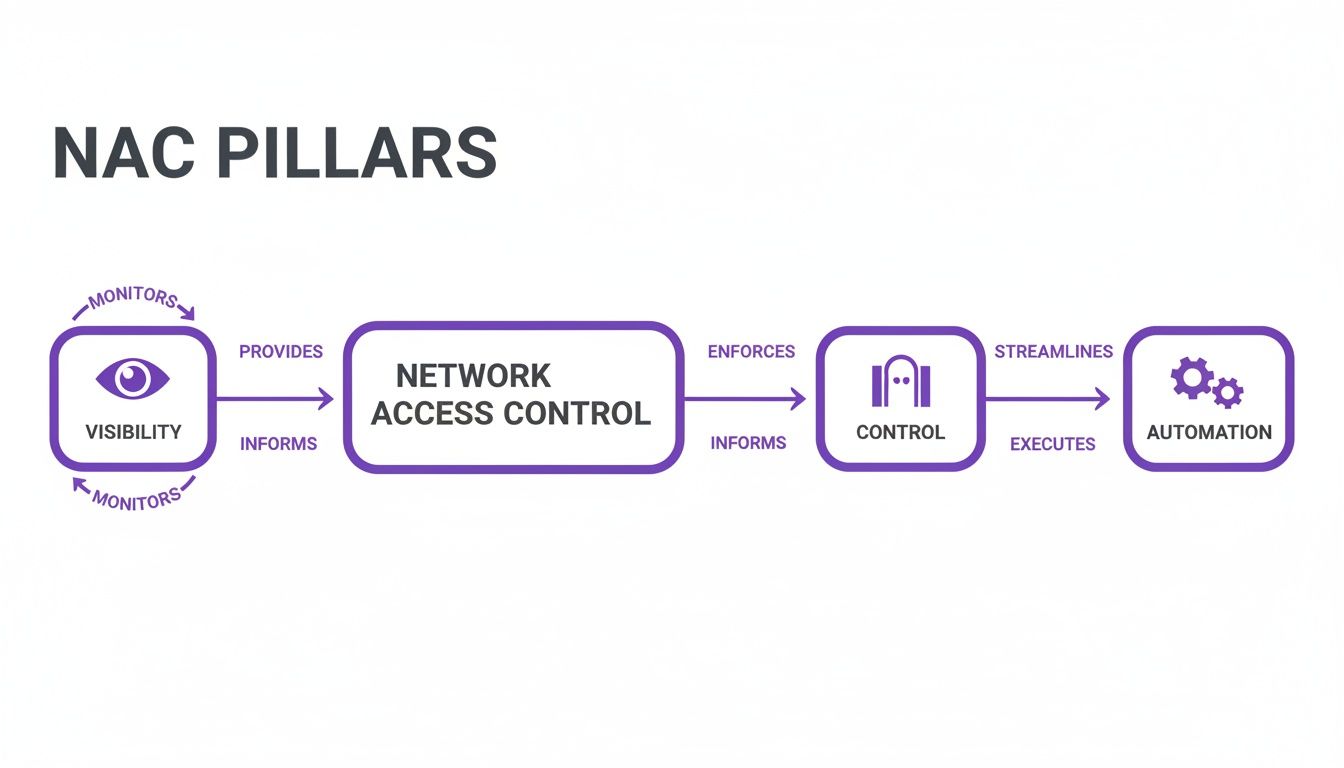
The pillars of visibility, control, and automation show how a NAC architecture must first see everything on the network, then apply the right rules, and finally, do it all automatically.
The Policy Server: The Strategic Brain
At the heart of every NAC system is the Policy Server. This is the strategic 'brain' of the whole operation. It doesn't talk directly to the devices trying to connect; instead, it holds the master rulebook—all the policies and settings that define what "secure" means for your network.
When a device tries to connect, information about it is fired off to the Policy Server. The server then checks its rules: Is this a known user? Is their device up to scratch with our security requirements? What level of access should they get? This is often where integrations with identity providers like Entra ID or Okta come into play, linking a user’s identity directly to their access rights.
Network Sensors: The Eyes and Ears
Next up are the Network Sensors, or agents. Think of these as the 'eyes and ears' deployed across your network, always listening for new connection attempts. Their job is to spot when a new device—whether it’s a laptop, smartphone, or IoT sensor—plugs in or tries to join the Wi-Fi.
Once a new device is detected, the sensor gathers some initial info and reports back to the Policy Server. It’s like an on-the-ground security guard spotting someone near a restricted area and radioing for instructions. This first alert is what kicks off the entire NAC workflow.
Enforcement Points: The Gatekeepers
Finally, we have the Enforcement Points. These are the 'gatekeepers' that actually carry out the commands from the Policy Server. The best part? These are usually the network devices you already own, such as:
- Wireless Access Points (APs): Controlling who gets to join the Wi-Fi.
- Network Switches: Managing access for anything physically plugged into your network.
- Firewalls and Gateways: Applying broader rules to all network traffic.
After the Policy Server makes its decision, it tells the relevant Enforcement Point what to do. That action could be granting full access, shunting the device to a limited guest network, or blocking it completely.
The real magic of a modern NAC solution is its ability to orchestrate these pieces seamlessly. For example, a user connects to the Wi-Fi (Enforcement Point), which alerts the Policy Server. The server checks the user's identity and device health, then tells the AP to move the user to the correct, secure network segment.
This architectural model is what allows solutions like Purple to work with your existing infrastructure from vendors like Meraki or Aruba. Instead of a costly "rip and replace" project, a smart NAC solution uses the hardware you already have, turning it into an active part of your security defence.
For a deeper dive into the protocols that make this communication happen, you can learn all about how a RADIUS server works in network authentication. This adaptability is what makes deploying powerful network access control solutions a far more practical and cost-effective reality for most businesses.
Key Capabilities of Leading NAC Solutions

So, what separates a basic network gatekeeper from a powerful, modern security platform? While older systems were all about simple allow-or-deny rules, today’s leading network access control solutions are packed with dynamic, intelligent features. They’ve moved far beyond outdated shared passwords to deliver granular, identity-driven security.
These advanced capabilities all work together, creating a security posture that's both stronger and more flexible. It’s about building a system that can adapt in real-time to every device needing access—from a corporate laptop to a guest's smartphone or a hospital's MRI machine. Let's look at the core features that define a top-tier NAC solution.
Identity-Based Authentication and Passwordless Access
The first, most fundamental job of any NAC is robust authentication. This is no longer about a single, easily shared Wi-Fi password. Modern NAC is built on identity, figuring out who is connecting, not just what is connecting.
This means shifting towards more secure and user-friendly methods. Advanced solutions offer a whole menu of authentication options to match different user types and security needs, such as:
- Passwordless Access: Using biometrics, push notifications, or cryptographic keys, users can get onto the network securely without ever typing a password. This is a massive win for both security and convenience.
- Certificate-Based Authentication: For company-owned devices, NAC can use digital certificates to silently and securely verify the device's identity every time it connects. This creates a seamless and highly secure experience for staff.
- SSO Integration: Tying into identity providers like Entra ID or Okta allows the NAC solution to use the organisation's central user directory as the single source of truth for who gets access to what.
Device Posture Assessment
A critical feature that really sets modern NAC apart is device posture assessment, often called a health check. Think of it as a security screening before a device is allowed through the gate. The NAC solution inspects any device trying to connect to make sure it meets your minimum security standards.
This assessment can check for all sorts of compliance markers:
- Is the operating system up to date with the latest security patches?
- Is antivirus software installed, running, and updated?
- Is the device’s firewall switched on?
- Does the device have unapproved or high-risk apps installed?
If a device fails this posture check, it doesn't just get blocked forever. A smart NAC can automatically shunt the device to a quarantine network. Here, it can provide resources to help the user fix the issues, like links to download required software updates. This automates enforcement and takes a huge load off your IT staff.
Dynamic Policy Enforcement and Micro-Segmentation
Once a user and their device have been authenticated and vetted, the NAC’s next job is to enforce the right access policies. This is where micro-segmentation comes into its own. Instead of one flat, open network where a threat can spread like wildfire, NAC carves out smaller, isolated zones.
Micro-segmentation is like having secure, keycard-only floors in a skyscraper. A guest can access the lobby and public areas, but their keycard won’t work for the executive or server room floors. This containment is crucial for stopping attackers from moving laterally across your network.
A powerful NAC solution can automatically place users and devices into the correct virtual network (VLAN) based on their role, device type, and even location. This means a guest on the Wi-Fi is completely sealed off from the network segment containing sensitive Point-of-Sale systems in a retail store. You can dive deeper into implementing these concepts in our complete guide to creating a secure wireless network .
The demand for this kind of integrated security is soaring. In the UK alone, the access control market hit USD 524.6 million in 2024 and is projected to climb to USD 830.7 million by 2030, driven by sectors like retail and hospitality upgrading their systems.
Choosing the Right NAC Deployment Model
Okay, you’ve decided a NAC solution is the way forward. The next big question is: how do you actually roll it out? This isn’t just a technical decision; it’s a strategic one that will directly affect your budget, your IT team's workload, and your ability to scale.
You’re essentially looking at three main paths: keeping everything on-premises, going fully cloud-based, or finding a middle ground with a hybrid approach. There’s no single right answer, but there’s definitely a right fit for your organisation. Let's dig into what each option really means for your business.
On-Premises NAC: The Traditional Fortress
Think of on-premises NAC as building your own fortress. You buy the bricks, you pour the concrete, and you station the guards. This means deploying dedicated hardware and software right inside your own data centres. You own it, you manage it, and you're responsible for every part of its upkeep.
- Full Control: The biggest draw here is total, granular control. If you’re in an industry with strict data sovereignty rules or specific compliance mandates, having all your data and hardware under your own roof might be non-negotiable.
- High Initial Cost: The flip side is a hefty upfront investment. You're buying physical appliances and paying for software licences, which can make for a serious capital expense.
- Maintenance Overhead: Your IT team is on the hook for everything—updates, patching, and managing the hardware lifecycle. This demands specialised skills and a significant chunk of their time.
This traditional route can work for a large, single-site business with a well-staffed security team and the budget to handle the upfront costs. For most modern companies, especially those juggling multiple locations, the cost and complexity can quickly become a deal-breaker.
Cloud-Based NAC: The Modern Approach
A cloud-based NAC, usually delivered as a service (SaaS), completely flips the script. Instead of you building and maintaining the infrastructure, the provider handles it all. The brains of the operation—the policy engine and management console—all live in the cloud.
Think of it like swapping a cumbersome, home-built generator for a subscription to the national power grid. You get reliable, scalable power without having to maintain the power station yourself.
Cloud-native solutions like Purple are built for this reality. They get rid of the need for on-site hardware controllers, which radically simplifies management. This is a game-changer for businesses with many sites, like retail chains or hotel groups, giving them a single pane of glass to manage network access across every single location.
| Feature | On-Premises NAC | Cloud-Based NAC |
|---|---|---|
| Initial Cost | High (hardware purchase) | Low (subscription fee) |
| Scalability | Limited by hardware | Nearly unlimited |
| Maintenance | Managed by internal IT | Managed by the provider |
| Deployment Speed | Slow (weeks to months) | Fast (days to weeks) |
| Best For | Single-site, high-control needs | Multi-site, agile businesses |
Some businesses try a hybrid model, aiming for the best of both worlds by keeping policy enforcement on-site but managing it from the cloud. While it can be a workable compromise, it often brings its own set of complexities, forcing you to manage two interconnected systems. For most, the sheer simplicity and agility of a pure cloud solution is the more compelling way forward.
A Strategic Path to Full NAC Deployment
The thought of switching to a new NAC system can feel like a massive undertaking. The good news is, it doesn't have to be a big-bang, overnight switch. A phased rollout is the smartest way to get it done, minimising disruption and ensuring a smooth transition. It's a journey from visibility to full, automated control.
Here’s a proven migration path that we see work time and time again:
- Start in Monitor-Only Mode: The first step is all about listening. You deploy the NAC solution in a completely non-intrusive 'monitor-only' mode. It sits quietly on your network, mapping every user, device, and connection without blocking a single thing. This gives you a complete, real-world picture of your network and a solid baseline to build your security policies on.
- Phased Enforcement for Low-Risk Groups: Once you have that clear map, you can start applying the rules. Begin with a low-risk group, like your guest Wi-Fi network or a specific department that uses standardised devices. This phase is your testing ground, letting you refine policies and work out any kinks in a controlled environment before expanding further.
- Expand to Full Network-Wide Control: With the confidence and insights gained from the initial phases, you're ready for the full rollout. You can now expand enforcement across the entire network. At this point, every access request—whether it's from an employee, a guest, or an IoT sensor—is automatically checked against your security policies. You’ve achieved complete, automated network access control.
Network Access Control in Action Across Industries
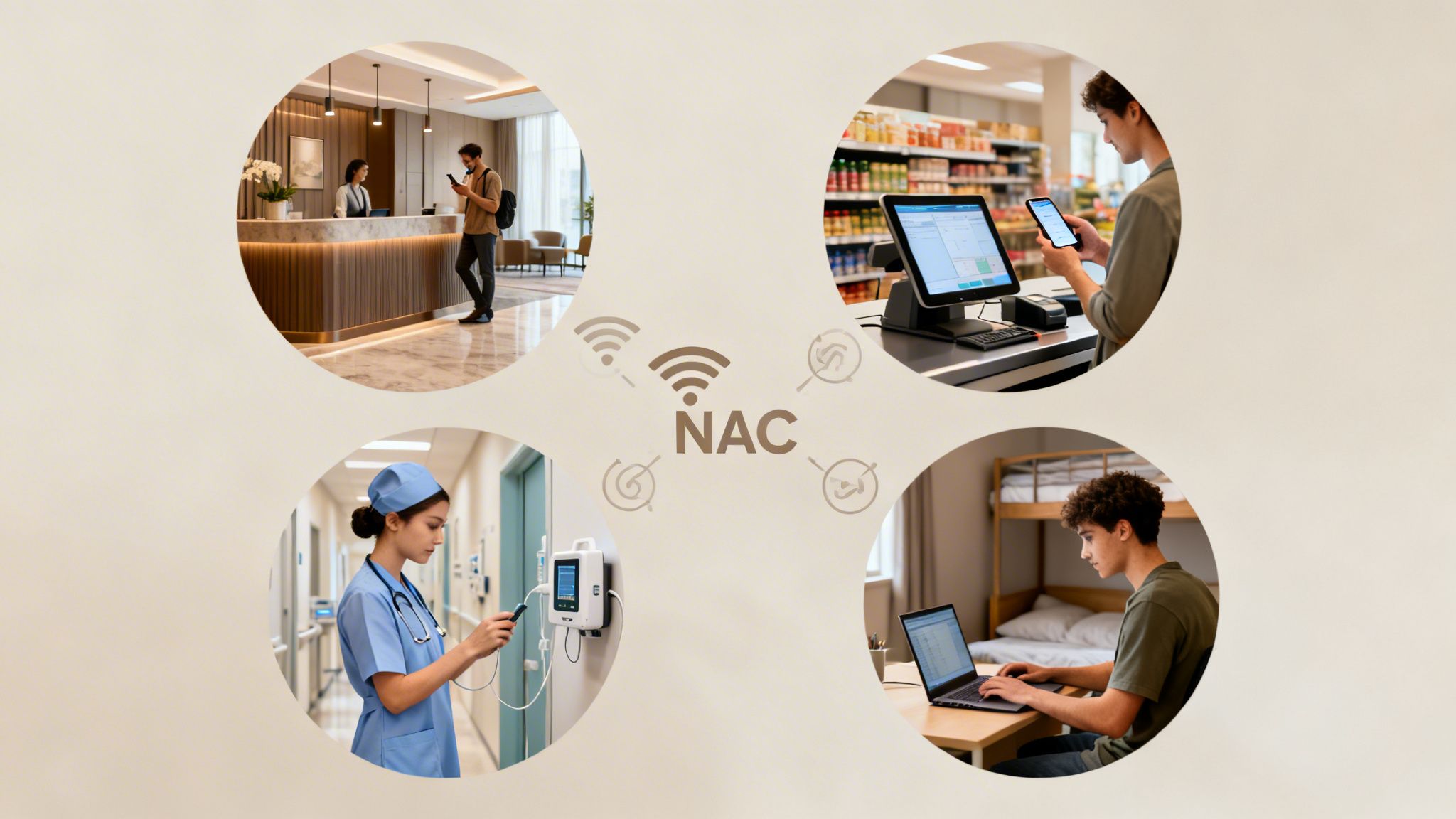
The theory behind network access control solutions is one thing, but their real worth shines through when you see them solving specific, real-world problems. While the core technology is the same, how it's used can look completely different from one business to the next. The way a hotel secures its guest Wi-Fi, for instance, is a world away from how a hospital needs to protect its life-sustaining medical equipment.
Let's look at how NAC gets put to work in a few key industries, turning security from an abstract idea into a practical, day-to-day advantage.
Hospitality and Venues
For hotels, stadiums, and conference centres, offering seamless yet secure Wi-Fi is a huge part of the customer experience. The challenge lies in juggling thousands of unknown guest devices while making sure they never get a sniff of the secure corporate network that runs the business.
This is where NAC comes into its own. It allows venues to slice up their network, creating totally separate virtual spaces for guests, staff, and back-office systems. For guests, the captive portal is much more than just a login screen; it's a powerful marketing engine.
By asking for a simple email or social login, venues can gather valuable first-party data. This insight can then fuel personalised offers and targeted marketing campaigns that encourage repeat visits—all while guests are safely firewalled away from critical operational systems.
Retail Environments
In a retail setting, the network is a hive of constant activity. It has to support everything from Point-of-Sale (POS) systems handling sensitive payment information to staff using tablets for inventory checks. Locking down this diverse ecosystem is absolutely essential.
NAC enforces micro-segmentation, building a digital wall around the POS network to shield it from all other traffic. So, if a staff member’s tablet or a guest's phone happens to get compromised, the threat is boxed in and can't spread to the payment terminals.
This sharp focus on data security is driving huge investment in the UK. The commercial sector, which includes retail and hospitality, now leads the access control market. It was valued at USD 0.44 billion in 2024 and is projected to hit USD 0.62 billion by 2029 as businesses double down on protecting their assets.
Healthcare Facilities
The stakes for network security don't get much higher than in healthcare. Hospitals are a complex web of connected devices, from life-critical Internet of Medical Things (IoMT) equipment like infusion pumps and patient monitors, to doctor's tablets and the public patient Wi-Fi.
A solid NAC solution is fundamental to ensuring patient safety and meeting tough regulatory standards. It works by automatically identifying, profiling, and segmenting every single device that tries to connect.
- IoMT Security: Medical devices are ring-fenced in their own isolated network segment, where they can only talk to authorised clinical systems. This stops them from becoming a target for malware that might be moving across the general network.
- Role-Based Access: Doctors, nurses, and admin staff are all given different levels of access based on their job. A doctor might need to access patient records from their tablet, while a facilities manager's device is restricted purely to the building management network.
- Patient and Visitor Isolation: Guests using the public Wi-Fi are kept completely separate from all clinical and operational traffic, protecting sensitive patient data from any potential exposure.
For any industry with strict rules, like healthcare, meeting data security and access control mandates is a top priority. Tackling HIPAA compliance IT requirements is often what kicks off the move to a more advanced network control strategy. For a real-world look at this, check out our https://www.purple.ai/case-studies/sarasota-memorial-hospital .
Residential and Student Housing
In multi-tenant buildings like student accommodation or build-to-rent properties, residents expect an internet experience that feels just like home—private, secure, and simple. But giving hundreds of people access to a single, shared network is a massive security headache.
Modern network access control solutions have a clever fix for this: Individual Pre-Shared Keys (iPSK). Each resident gets their own unique Wi-Fi password, which connects all their devices to a personal, private network "bubble." It gives them the robust security of an enterprise-grade network with the dead-simple usability of a home setup, preventing their devices from ever being visible to their neighbours.
When organisations start looking into network access control, a few common and very practical questions always come up. Getting clear, straightforward answers is the key to feeling confident and building a strategy that actually works for your business.
Let's tackle some of the most frequent queries that IT leaders and network admins have when they're weighing up a new NAC platform.
How Is NAC Different from a Firewall?
This is easily one of the most common questions, and it’s a really important distinction to make.
Think of a firewall as the security on the perimeter of your building. It’s checking everything that comes from the outside world (the internet), and it's brilliant at stopping external threats before they even get to your front door.
A NAC solution, on the other hand, is like the security guard inside your building. Once someone is past the main entrance, the guard checks who they are and what they're trying to do. NAC scrutinises every user and device after they’ve connected, controlling which rooms (or network segments) they’re allowed to enter. It’s focused on internal threats and preventing an intruder from moving around freely—a blind spot for most firewalls. You really need both for a strong security posture.
How Does NAC Integrate with Other Security Tools?
A modern network access control solution shouldn't operate in a silo. In fact, its real power comes from acting as a central enforcement hub that makes your existing security tools even better. A good NAC should fit seamlessly with:
- Identity Providers (IdP): Tools like Entra ID or Okta become the "single source of truth" for who a user is. The NAC platform then uses this information to automatically apply the right access policies based on their role.
- Endpoint Protection (EDR): Before granting access, NAC can check with an EDR agent on a device to confirm its health. Is the antivirus up to date? Are the security patches installed? This ensures devices meet your security standards before they can connect.
- Security Information and Event Management (SIEM): NAC sends a goldmine of contextual data (who, what, where, and when) into your SIEM. This dramatically improves your ability to spot threats and respond to incidents because you have a much clearer picture of what's happening on your network.
NAC doesn't just add another layer of security; it multiplies the effectiveness of the tools you already have by providing the missing link between user identity, device health, and network enforcement.
How Can We Justify the Investment?
When it comes to justifying the cost, it really boils down to two things: reducing risk and boosting operational efficiency.
The average cost of a data breach is always climbing, and a single incident caused by an unsecured laptop or a compromised guest device can be financially devastating. NAC directly tackles this risk by stopping unauthorised access before it can cause any damage.
On top of that, think about the time your IT team spends on manual tasks. A cloud-based NAC automates things like onboarding new devices, managing guest access, and enforcing security policies. This frees up your team from repetitive, manual work so they can focus on projects that actually move the business forward.
Ready to replace outdated passwords with seamless, secure, identity-based networking? Discover how Purple delivers Zero Trust access for guests, staff, and multi-tenant environments by integrating with your existing network infrastructure. Explore the Purple platform .