
Proper network and wireless security isn't just an IT chore anymore. It's now a core part of running a business, essential for protecting data, keeping operations running smoothly, and building trust with your customers. In a world that’s always connected, securing your network is as vital as locking your front door at night.
The Evolving Landscape of Network Security
Think of your business network like a house on a busy city street. Years ago, a simple lock on the front door—a basic password—was probably enough to feel safe. Today, that same house is being watched by skilled people actively looking for a way in. Leaving a door unlocked, or even using an old lock that’s easy to pick, is basically an open invitation for trouble.
That analogy hits the nail on the head when it comes to network and wireless security. The old "castle-and-moat" strategy, where everything inside the network walls was trusted by default, is now dangerously obsolete. This model relied on a strong outer wall (your firewall) but offered almost no protection if someone managed to get inside. Once a threat slipped past that single layer, it had free rein.
Why Traditional Methods Are Failing
The massive shift to cloud services, remote working, and the explosion of IoT devices has completely dissolved that traditional network perimeter. Your "house" now has countless digital windows and doors, and every single one is a potential entry point for an attacker.
Simple shared passwords and wide-open guest networks are the digital equivalent of leaving a key under the doormat. They create huge security holes because they treat every user the same, giving you no real way to see who is doing what on your network.
This complexity has given rise to a booming cybersecurity industry. In the UK alone, the cybersecurity sector now generates £13.2 billion in revenue and contributes £7.8 billion to the economy. This growth shows just how urgent the need for better security has become for everyone, from hotels and hospitals to retail shops and large venues.
The Rise of Modern, Identity-Driven Security
To tackle these new challenges, the industry has shifted towards a much smarter, identity-focused model. This modern approach is built on a simple but powerful idea known as Zero Trust: "never trust, always verify."
Instead of just assuming a user on your internal network is safe, a Zero Trust model authenticates and authorises every single connection request, no matter where it comes from. It treats every user and device as a potential threat until they are proven to be trustworthy.
This change in mindset requires a completely new set of tools and strategies, which we’ll cover in this guide. These modern solutions don’t just care about a device's location; they focus on verifying its identity before granting any access.
Key security vulnerabilities have driven the development of these modern solutions. The table below summarises the shift from risky, traditional approaches to the secure methods used today.
Key Security Challenges and Modern Solutions
| Security Challenge | Traditional (Risky) Approach | Modern (Secure) Solution |
|---|---|---|
| Guest & User Access | Single shared password (PSK) for everyone | Individual credentials (iPSK, 802.1X, SSO) |
| Network Perimeter | "Trust but verify" inside the firewall | Zero Trust: "Never trust, always verify" |
| Network Structure | Flat network where all devices can communicate | Network segmentation to isolate user groups |
| User Experience | Clunky, unsecure captive portal logins | Seamless, passwordless authentication (Passpoint) |
This evolution towards identity-driven security is crucial for any modern business. It's about building a more resilient and intelligent defence that can adapt to today's threats.
Key strategies now include:
- Seamless Authentication: Moving away from clunky captive portals to passwordless methods that are both far more secure and much easier for users.
- Granular Access Control: Giving people access only to the specific resources they need to do their job, and nothing more. This is also known as the principle of least privilege.
- Network Segmentation: Breaking the network into smaller, isolated zones. If a breach does occur, it's contained to one small area instead of compromising the entire network.
For any venue, learning how to design a network that is secure from the ground up is fundamental to protecting sensitive data. Modern platforms like Purple are built to solve these exact problems, giving you the tools to implement strong, identity-based security without creating a headache for your IT team.
Understanding Common Wireless Network Threats
To build a solid defence, you first need to know what you’re up against. The threats targeting your network and wireless security aren't abstract concepts; they are concrete, clever, and constantly evolving. They can range from simple, frustrating disruptions to sophisticated data theft.
Forget the idea of a battering ram at the castle gates. Think more along the lines of a skilled impersonator trying to sweet-talk their way inside. Many of the most effective attacks prey on the trust of your employees and guests, using deception rather than brute force.
Let’s pull back the curtain on some of the most common attacks you're likely to face.
The Dangers of Deception and Impersonation
One of the most widespread and dangerous threats is the "Evil Twin" attack. Picture a malicious actor setting up a rogue WiFi access point in your hotel lobby or retail store. They give it a perfectly believable name, like "Free_Hotel_WiFi" or "Store_Guest_Network"—making it look identical to your legitimate network.
An unsuspecting guest connects, thinking it's the real deal. From that moment on, every piece of information they send is intercepted by the attacker. Passwords, credit card details, private messages—it's all captured. It’s the digital equivalent of a con artist setting up a fake cash machine that looks real but just skims your card and PIN.
This type of attack exposes a fundamental weakness in traditional, open guest networks. Without a way to prove a network’s identity, users have no idea if they are connecting to a genuine access point or a malicious trap.
Another common trick is session hijacking. Here, an attacker on the same unsecured network essentially "steals" a user's active session. After someone logs into a website or app, the attacker hijacks their session token. This lets them impersonate the user without ever needing a password, giving them free rein to access private accounts, send messages, and steal sensitive data.
Causing Chaos with Disruption Attacks
Not all attacks are about theft; some are designed purely to cause disruption. A deauthentication attack is a perfect, and alarmingly simple, example. The attacker simply sends forged "deauthentication" packets to connected devices, tricking them into dropping their connection to the legitimate WiFi network.
This creates a frustrating denial-of-service (DoS) situation. For your customers, it means constant connection drops. For your business, it could disrupt critical operations like point-of-sale systems or inventory scanners. For any busy retailer or hospitality venue, this can mean direct revenue loss and serious damage to your reputation.
Disturbingly, recent findings show that over 94% of Wi-Fi networks in the UK are vulnerable to these deauthentication attacks, making it a critical security challenge. These disruptions can completely ruin a guest's experience and bring business to a grinding halt. You can explore more on these cybersecurity statistics and their implications on cobalt.io .
These examples, from subtle impersonation to outright disruption, show exactly why robust network and wireless security is non-negotiable. Using encrypted and authenticated connections isn't just a best practice; it's a fundamental requirement for protecting your business and your customers.
Building Your Digital Fortress with Modern Protocols
Knowing the threats to your network and wireless security is the first step. Now, let’s talk about the solutions. If you want to build a truly secure wireless environment, you have to move beyond outdated, shared passwords. It’s time to embrace a new generation of security protocols built to protect your data and your users from the ground up.
Think of these protocols as specialised tools for building a digital fortress. Each one plays a unique role, but they all work together to create strong, layered defences. Getting a handle on them is essential for any IT admin or business owner tasked with providing secure connectivity.
WPA3: The New Standard in Encryption
The most basic layer of any wireless security is encryption. For years, WPA2 was the go-to standard, but it’s showing its age and becoming more vulnerable. Its successor, WPA3 (Wi-Fi Protected Access 3), is the modern digital lock for your WiFi network, offering much stronger protection.
WPA3 brings several key improvements that make it significantly harder for attackers to break in. It replaces the old handshake process, which could be exploited, with a more secure method called Simultaneous Authentication of Equals (SAE). This makes it almost impossible for attackers to guess passwords using offline dictionary attacks, even if the password itself isn't very strong.
For venues with open or public networks, WPA3 has a game-changing feature: Individualised Data Encryption. Even on a password-free network, WPA3 automatically encrypts the connection between each user's device and the access point. This stops eavesdroppers from spying on other people's traffic—a massive security upgrade for any guest WiFi.
This diagram illustrates some of the very threats that WPA3 and other modern protocols help you defend against.
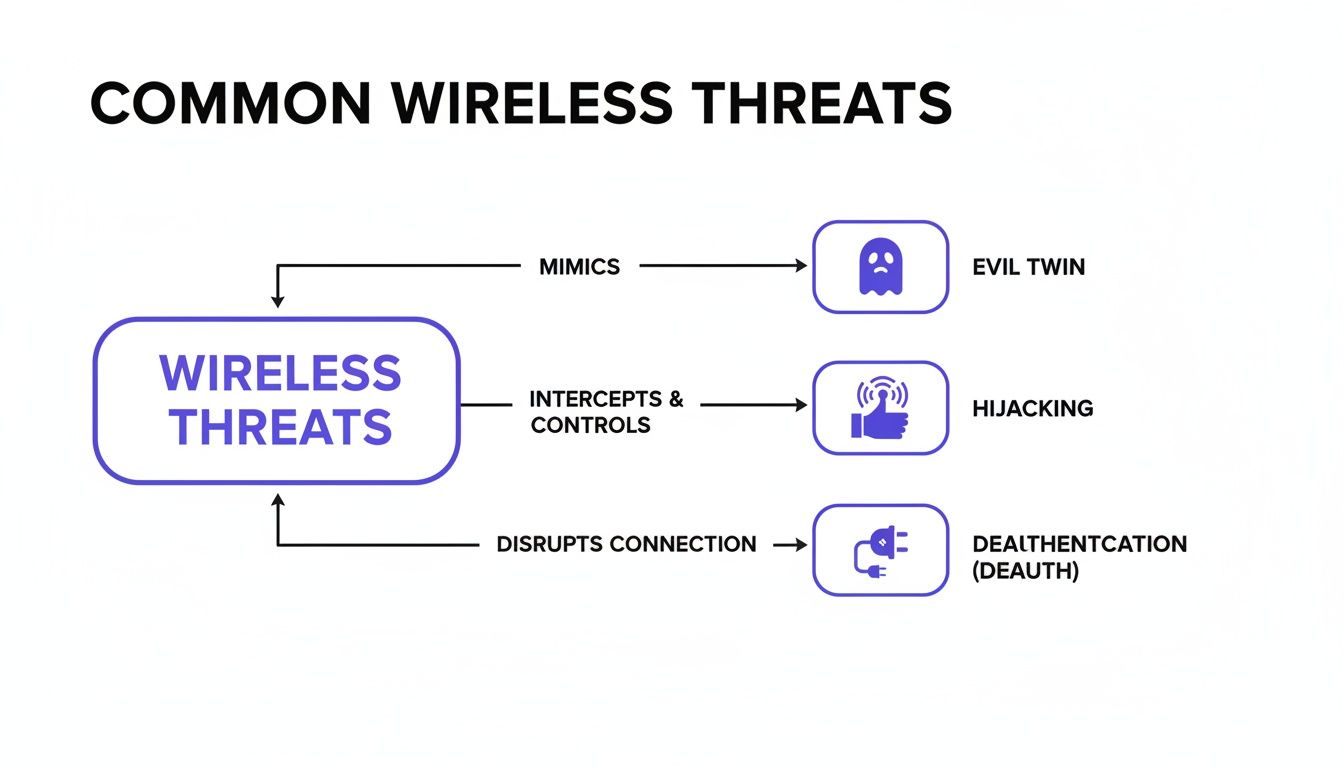
You can see how common attacks like Evil Twin networks, session hijacking, and deauthentication attacks take advantage of the weaknesses found in less secure network setups.
802.1X: The Digital Bouncer
While WPA3 provides powerful encryption, it doesn't solve the authentication problem—that is, verifying who is allowed on your network. This is where 802.1X comes into play. Think of it as a strict but efficient digital bouncer standing at the door to your network.
Instead of one shared password that everyone uses (and can easily be leaked), 802.1X makes each user present their own unique credentials. This is usually managed by a central authentication server, ensuring only authorised people or devices can get access. If an employee leaves the company, their access can be cut off instantly without disrupting anyone else.
For corporate environments, this approach gives you two huge advantages:
- Accountability: Because every user has unique credentials, you get a clear audit trail of who connected, when they connected, and from where.
- Security: It completely gets rid of the risks that come with shared passwords. There’s no single key to be stolen or passed around.
Passpoint: The Global WiFi Passport
For any public-facing venue, the user experience is just as critical as security. The old way of doing things—finding a network, dealing with a clunky login portal, and typing in details every single time—is just plain frustrating. This is exactly the problem that Passpoint (which is part of the OpenRoaming framework) was designed to fix.
Imagine having a global WiFi passport. You set it up once on your device, and from then on, you automatically and securely connect to participating WiFi networks all over the world. Airports, hotels, stadiums, city centres—you connect instantly without ever seeing a login screen again.
Passpoint works by letting your device automatically discover and authenticate to a network using a secure, pre-approved profile. The connection is encrypted with WPA3 from the very first packet of data, making sure you are never exposed to the dangers of an open network. It’s the ultimate combination of top-tier security and complete user convenience, changing how we all interact with public WiFi.
Taking Control with Advanced User Authentication
Strong encryption creates the secure "tunnels" for your data, but how do you decide who gets to use those tunnels in the first place? That's the job of authentication—the process of making sure users and their devices are exactly who they claim to be. If there’s one step you can take to seriously upgrade your network and wireless security, it’s moving beyond insecure, shared passwords.
Think of it this way: instead of handing out a single master key that everyone shares, advanced authentication gives each person their own unique key. When done right, this not only locks down your network but can also make connecting a breeze for your users. Let's look at a couple of powerful ways to do this for both your staff and your guests.
Certificate-Based Authentication for Staff
For your internal team, certificate-based authentication is like giving each employee's device a corporate ID badge that's impossible to forge. Instead of relying on a password that can be forgotten, stolen, or scribbled on a sticky note, this method uses a unique digital certificate installed directly on their company-managed device.
When an employee opens their laptop or pulls out their phone, the device automatically presents its certificate to the network. If the certificate is valid, access is granted instantly and securely. It’s a completely seamless, "zero-touch" experience for the user—they just connect, and it works.
This approach is a cornerstone of modern, identity-driven security. It tightly binds access rights to a trusted, company-managed device, making it much harder for an unauthorised person to sneak onto your network. If a laptop is lost or an employee moves on, you can instantly revoke the certificate, cutting off access immediately.
This is a massive leap forward from traditional password systems, which are a constant source of helpdesk tickets and a huge security risk. To make this happen, a central authentication server is the key piece of the puzzle. You can get a better handle on this by exploring what a RADIUS server is and the role it plays.
Comparing Modern Authentication Methods
Choosing the right authentication isn't a one-size-fits-all decision. The best approach depends on who is connecting—a trusted employee, a temporary guest, or a smart device—and what level of security and convenience you need to provide.
| Authentication Method | How It Works | Best For | Security Level |
|---|---|---|---|
| Certificate-Based | A unique digital certificate is installed on a trusted device, which is presented automatically to the network for access. | Staff and corporate-owned devices. | Very High |
| Identity PSK (iPSK) | Every user or device is assigned its own unique password (pre-shared key) for the Wi-Fi network. | Guests, BYOD, IoT devices, multi-tenant units. | High |
| Single Sign-On (SSO) | Users log in once with their existing company or social credentials (e.g., Microsoft 365, Google) to gain network access. | Staff, contractors, and registered guests. | High |
| Captive Portal | Users are directed to a web page to enter details (like an email or voucher code) or accept terms before connecting. | Public guest Wi-Fi in retail, hospitality. | Low to Medium |
Each method offers a different balance. Certificates provide the highest security for trusted assets, while iPSK and SSO offer a fantastic blend of security and convenience for a wider range of users. Captive portals remain useful for simple, open-access guest scenarios.
Identity Pre-Shared Keys for Guests and Devices
In guest-heavy environments like hotels or for networks with a mix of personal gadgets and smart devices, managing individual certificates just isn't practical. This is where Identity Pre-Shared Keys (iPSK), sometimes called Private PSK, provide a brilliant and secure alternative. With an iPSK system, every single user—or even every device—gets its own unique password for the network.
It’s like checking into a modern hotel. Instead of getting a copy of a single master key, the front desk gives you a keycard that only works for your room. iPSK does the exact same thing for your Wi-Fi.
Here’s how you might see it in action:
- A hotel guest checks in and is automatically given a unique Wi-Fi key that's valid only for their stay. It works on their laptop, phone, and tablet, but it’s tied just to them.
- A resident in a smart apartment building receives one iPSK for their entire unit. This key connects their smart TV, speakers, and personal devices to their own private network, completely walled off from their neighbours.
- A contractor visiting an office for a week is issued a temporary iPSK that provides limited network access and automatically expires when their project is finished.
This approach strikes a fantastic balance between tight security and user simplicity. It completely removes the massive risk of a shared password getting out, but it’s still incredibly easy for non-technical users to manage. When you're setting up guest accounts, remember that privacy is just as important as security. Using tools like temporary phone numbers for account verification can add another crucial layer of protection for your users.
Best of all, by isolating each user’s traffic, iPSKs stop their devices from seeing or talking to each other. This dramatically shrinks your attack surface and stops a potential breach on one device from spreading across the network. It effectively turns a potentially chaotic public network into a collection of private, secure bubbles.
Applying Zero Trust and Network Segmentation

Getting your protocols and authentication right is a huge win for network and wireless security. But these are just the foundations. To build a truly resilient network, you need to think differently about its design. This means adopting two principles that are changing the game for security: Zero Trust and network segmentation.
For years, security followed a "castle-and-moat" model. If you were inside the network walls, you were trusted by default. In a world of mobile workforces, cloud apps, and countless personal devices, that approach is not just outdated; it's a massive security risk. The network "perimeter" isn't a clear line anymore.
It's time for a new security mindset, starting with a powerful assumption.
Adopting the Zero Trust Mindset
The core idea of a Zero Trust model is refreshingly simple: "never trust, always verify." It completely discards the old notion of a safe, trusted internal network. Instead, every single request for access is treated as a potential threat, no matter where it comes from.
Every user, device, and application has to prove who they are and that they're authorised to be there, every single time. This isn't just a one-off check at the door; it's a constant process of verification. Access is granted based on proven identity, not just physical location on the network.
A Zero Trust approach doesn't just check your ID at the front door; it asks for it again at every internal doorway. This ensures that even if an attacker gets inside one room, they can't just wander freely into others.
This approach makes your network far more secure. It protects you from external attacks and insider threats by enforcing the rule of least privilege. Put simply, users and devices only get access to the absolute minimum they need to function, and nothing more. While it sounds complex, modern platforms are making it much easier to implement a Zero Trust security model across your wireless networks.
Containing Threats with Network Segmentation
Working hand-in-hand with Zero Trust is network segmentation. If Zero Trust is the philosophy of constant verification, then segmentation is the architecture that enforces it. The basic idea is to chop up a large, open network into smaller, self-contained, and isolated zones.
Think of it like a building's fire safety system. In a huge, open-plan office, a fire in one corner can quickly spread everywhere. But if that office is divided into separate rooms with heavy fire doors, a fire that starts in one room stays in that room. The rest of the building is safe.
Network segmentation does exactly that for your digital traffic. It builds firewalls between different parts of your network.
This has immediate and practical uses for any business or venue:
- Separating Traffic Types: You can create a dedicated segment for guest WiFi that is completely walled off from the network running your critical systems, like point-of-sale terminals, staff PCs, or building controls.
- Isolating User Groups: On the guest network, you can even isolate each individual user from every other user. Often called client isolation, this simple step prevents a visitor's compromised laptop from attacking other guests on the same WiFi.
- Protecting Sensitive Devices: Crucial but vulnerable devices, like security cameras or IoT sensors, can be put into their own highly restricted segment, only allowed to talk to specific, pre-approved servers.
By designing your network this way, you shrink your "attack surface" enormously. An attacker who breaches a low-security zone, like the guest network, is trapped. They can't move sideways to attack more valuable targets on other segments. This containment strategy is one of the single most effective ways to limit the damage from any security incident.
Turning Security Analytics into Business Intelligence
Great network and wireless security isn't a "set it and forget it" task; it's a living, breathing process. A truly secure network needs constant monitoring and analysis. Think of security analytics as a high-tech digital CCTV system for your network, giving you a real-time view of who is connecting, from where, and what they’re doing once they’re on.
This approach takes network management far beyond just spotting threats. When you start analysing connection data, you begin to see patterns in how people behave. This kind of information is gold, not just for tightening security, but for driving business growth. It helps turn your network from a necessary cost into a real strategic asset.
From Security Data to Business Insight
The data pouring out of a secure network is an incredibly rich source of intelligence. This is where your security and business goals finally shake hands, letting you clearly show a return on your infrastructure investment.
Here’s what that looks like in the real world:
- Retail Venues: Can track footfall patterns, pinpoint popular zones, and measure how long customers stay to optimise store layouts and staff schedules.
- Hospitality Groups: Can recognise loyal, returning guests across their entire hotel portfolio, opening the door for personalised offers and better service.
- Transport Hubs: Can monitor passenger flow during busy periods to ease congestion and make the travel experience smoother for everyone.
This shift in thinking is absolutely vital. Your secure network stops being just a defensive shield and becomes a smart network that actively creates business value. Every single connection gives you a new data point to help make smarter operational and marketing decisions.
Proving ROI and Boosting Security
Constant analysis doesn’t just reveal business opportunities; it’s also crucial for keeping your security posture strong. By watching network traffic, you can catch anomalies that might signal a security breach, find devices that aren't configured correctly, or spot unauthorised users trying to get in.
This proactive stance is essential to stay ahead of threats. You can learn more about proactive defence and why DNS filtering is so important in our guide on The 10-day window for modern threats .
As the security picture evolves, putting solid analytics in place is non-negotiable. You can explore new ways to use these tools, including insights on architecting proactive Copilot security with Microsoft Sentinel . Platforms like Purple have built-in analytics that transform raw WiFi data into clear, actionable dashboards. This lets you track key metrics, understand user demographics, and feed insights directly into your CRM or marketing tools, proving the undeniable value of a secure, intelligent network.
Frequently Asked Questions About Network Security
As businesses and venues look to modernise their network and wireless security, it's natural for questions to pop up. Getting clear, straightforward answers is the first step toward making confident decisions that protect your operations and give users a better experience. Let's dig into some of the most common queries from IT managers and venue operators.
Is WPA3 Enough to Secure Our Guest WiFi Network?
While WPA3 is a massive leap forward from WPA2 with its much stronger encryption, it’s only one piece of the security puzzle. On its own, WPA3 doesn't handle who gets on your network, nor does it stop every type of attack. Think of it as a seriously strong lock on a door – you still need a solid process for deciding who gets a key.
A genuinely secure network pairs WPA3 encryption with strong authentication methods. This could be 802.1X for staff or an identity-based approach like iPSK for guests. This way, not only is the traffic scrambled, but every single user and device is properly identified and approved before they can even connect. It’s all about creating a vital multi-layered defence.
Is a Zero Trust Model Too Complex for a Small Business?
Not anymore. It’s true that in the past, putting a Zero Trust strategy into practice was a huge, expensive undertaking best suited for large enterprises with deep pockets. Today, modern cloud-based platforms have made it accessible for organisations of any size. It's really a scalable mindset you can start putting into action right away.
By using identity integrations and features like iPSK, you can enforce the core principle of Zero Trust—"never trust, always verify"—without needing costly servers on-site or a large IT team. You can begin simply by splitting guest and staff traffic, then add more specific policies as you go.
How Is Identity-Based Networking Better Than a Shared Password?
A classic captive portal that uses one password for everyone (like 'GuestWiFi123') is fundamentally broken. When everyone shares the same key, there's no way to track individual users, kick one person off, or stop people from seeing each other's devices on the network.
Identity-based networking fixes all of this. Each user proves who they are individually, whether through an email address, a social media account, or their corporate login. This immediately creates an audit trail, lets you revoke access for a specific person instantly, and allows for true network isolation where each user is in their own secure bubble. It transforms an anonymous, high-risk network into a secure, accountable one.
What Is the Main Benefit of Network Segmentation?
In a word: damage control. Network segmentation works by slicing your network into smaller, isolated zones. A great analogy is the watertight compartments on a ship; if one compartment is breached (like your guest WiFi), the flooding is contained and can’t sink the whole vessel.
This isolation is crucial for protecting your most sensitive areas, such as the corporate network, payment systems, or building management controls. It drastically limits the potential fallout from an attack and stands as one of the most effective strategies in modern network and wireless security.
Ready to replace outdated shared passwords with secure, seamless access? Purple provides an identity-based networking platform that enables Zero Trust security for guests and staff, integrates with your existing hardware, and turns your network into a source of valuable business insights. Learn more about how Purple can modernise your network security .