
A router with WPS was meant to be the ultimate shortcut for connecting to your Wi-Fi, getting rid of the hassle of typing in long, complicated passwords. This feature, Wi-Fi Protected Setup, was all about convenience—letting you join a network with a simple button press or an 8-digit PIN. But while it was widely adopted for being so user-friendly, that simplicity came with a serious security flaw that’s still a major concern today.
What Is WPS and Why Was It Created?
Cast your mind back to the mid-2000s. Home Wi-Fi was quickly becoming a household essential, but connecting a new printer or games console was often a pain. You’d have to flip the router over, squint at a tiny label, and painstakingly type a long string of random characters. It was a frustrating experience for most people, and the industry knew it needed a simpler way to get devices online.
This is where Wi-Fi Protected Setup (WPS) came in. Introduced by the Wi-Fi Alliance around 2007, its goal was clear: create a foolproof, almost instant way for devices to join a secure wireless network. It was designed to be the digital equivalent of a universal key, working with just a single action. This focus on pure ease of use made a router with WPS a standard feature in nearly every home.
The Trade-Off Between Simplicity and Security
The system was an immediate hit, arriving just as the smartphone era began to explode. That convenience, however, came at a steep, hidden cost. It wasn’t long before security researchers uncovered a deep-seated flaw in the PIN method.
The core problem is that an 8-digit PIN is not checked as one complete number. Instead, it is validated in two separate halves, drastically reducing the number of combinations an attacker needs to guess to break in.
This single design mistake turned a handy feature into a gaping security hole. Since its debut, millions of UK households have been left exposed. One report flagged that around 1.2 million UK households were using vulnerable WPS-enabled routers, susceptible to attacks that could crack the PIN in just a few hours. Even though the Wi-Fi Alliance officially deprecated the flawed PIN method back in 2011, the feature lingers on many devices, posing an ongoing risk. You can explore more data on the UK Wi-Fi router market to see just how common it still is.
The Hidden Security Dangers of a Router with WPS
While the convenience of a router with WPS is tempting, its design contains a fundamental security flaw that can put your entire network at risk. The real danger isn’t the push-button method, but the 8-digit PIN. Attackers don’t need to be anywhere near your router; they can exploit this PIN from afar using freely available software.
This glaring vulnerability comes down to a critical mistake in how the PIN is checked. Instead of validating all eight digits at once, the router checks the PIN in two separate, smaller chunks. It first confirms the initial four digits are correct, and only then does it move on to the next three (the eighth digit is just a checksum).
This process essentially breaks one bigger problem into two tiny, easily solvable ones.
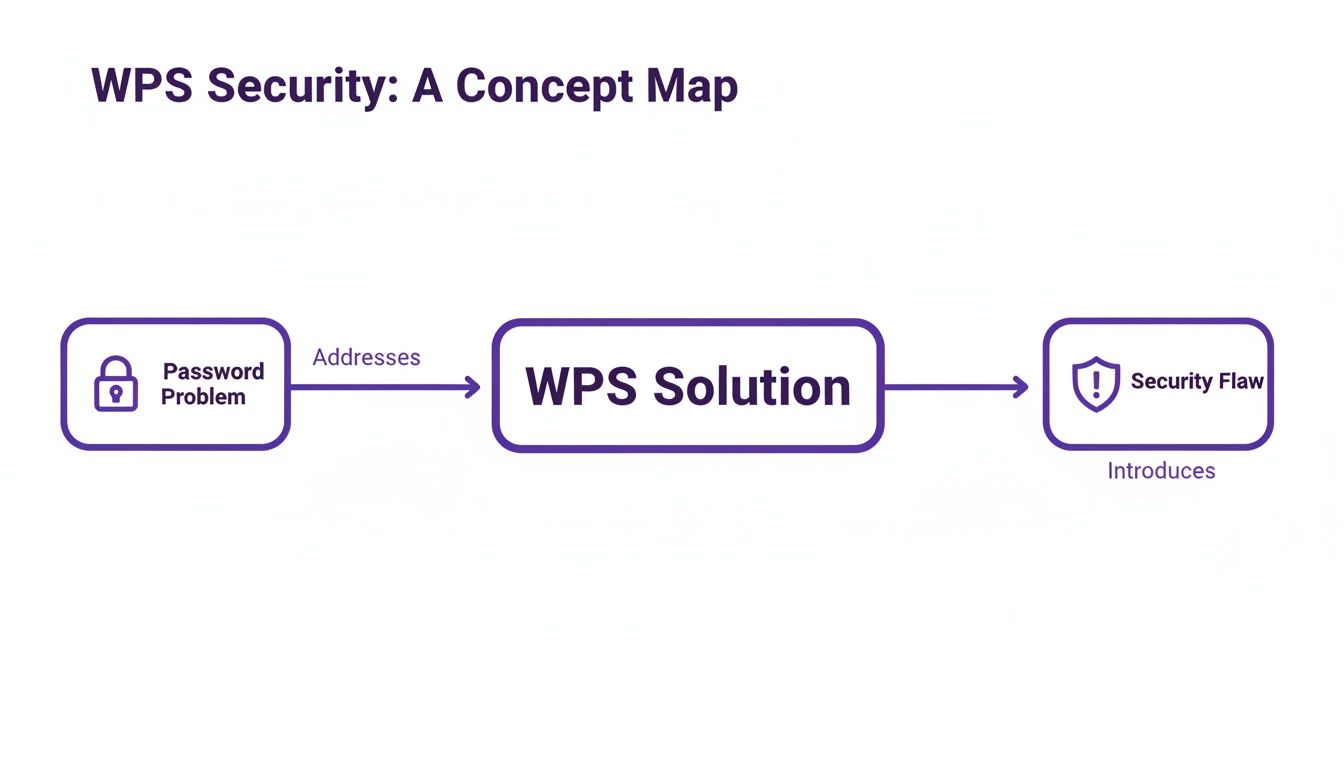
As you can see, WPS was created to solve the "long, complicated password" problem but, in doing so, introduced a far more serious security hole.
The Brute-Force Attack Made Easy
This design flaw dramatically slashes the number of guesses an attacker needs to make. Instead of brute-forcing all 100 million possible 8-digit PINs, they only have to guess a 4-digit number and then a 3-digit number.
Let's break that down:
- First Half: There are only 10,000 possible combinations for the first four digits (0000-9999).
- Second Half: There are a mere 1,000 possible combinations for the next three digits (000-999).
Suddenly, a seemingly impossible task becomes trivial. An attacker only has to try a maximum of 11,000 combinations instead of 100 million. This entire process can be automated with tools like Reaver, which will chew through every possible PIN until it finds the right one—a process that can take just a few hours.
Think of it like a bank vault with an 8-digit lock. If the lock helpfully beeped every time you guessed the first four digits correctly, cracking the full code would become ridiculously simple. This is exactly how the WPS PIN vulnerability works.
The table below starkly contrasts the effort required to break a WPS PIN versus a standard, strong WPA2 password.
WPS PIN Attack vs Standard WPA2 Password Attack
| Attack Vector | Target | Effective Complexity | Typical Time to Breach | Primary Risk |
|---|---|---|---|---|
| WPS PIN Attack | 8-digit PIN (validated in two halves) | 4 digits, then 3 digits (11,000 guesses max) | A few hours | Design flaw allows for rapid, automated attacks. |
| Standard WPA2 Attack | 12+ character alphanumeric password | 12+ characters (trillions of combinations) | Months, years, or practically impossible | Requires immense computing power and time. |
The difference is staggering. The WPS PIN design hands attackers an incredible shortcut, rendering the strength of your actual Wi-Fi password completely irrelevant.
Once an attacker gets the WPS PIN, they can easily retrieve your WPA/WPA2 password, giving them full, unrestricted access to your network. This makes any router with WPS enabled a major liability. A 2026 Which? report found that 73% of 50 top UK routers with WPS were vulnerable to attacks that could succeed in under 24 hours. The risk is just as real in professional settings; an NHS Digital audit revealed WPS was active on 41% of hospital guest networks, exposing sensitive data.
Real-World Consequences for Businesses
For any business, a compromised network is a catastrophe. It can lead to everything from data theft and malware deployment to crippling reputational damage. An attacker could be sitting on your network, silently intercepting customer information or launching attacks against your internal servers.
Understanding the broader context of securing your network routers is crucial, but dealing with WPS is the immediate priority. Simply put, disabling WPS on all your hardware is a non-negotiable first step in hardening your defences. From there, you can explore broader topics in network and wireless security to build a truly resilient infrastructure.
How to Find and Disable WPS on Your Network
Given the serious security flaws baked into any router with wps, turning the feature off isn't just a good idea—it's a fundamental step in securing your network. The good news is that it’s a straightforward fix that gives your defences an immediate and significant boost against common attacks. The first move is to figure out if your router has WPS active.

Many routers make this easy with a physical button. Have a look at the back or side of your device. You're searching for a button labelled "WPS" or one with the universal WPS logo: two curved arrows pointing at each other. If you see that button, you can be sure the feature is present.
Accessing Your Router's Admin Panel
Even without a physical button, WPS could still be quietly running in the background via the router's software. To shut it down for good, you'll need to log into your router's administration interface, often called the admin panel or dashboard.
Generally, the process looks like this:
- Find the Router’s IP Address: This is almost always printed on a sticker on the router itself. Common addresses are 192.168.1.1 or 192.168.0.1.
- Enter the IP in a Browser: Open a web browser on a computer connected to the network and type that IP address into the address bar.
- Log In: You’ll be asked for a username and password. If you haven't changed these, the defaults will also be on the router's sticker.
Once you're logged in, you have access to the nerve centre of your network. This is where you can configure everything from the network name to its most important security protocols.
Turning Off the WPS Feature
With the admin panel open, your next task is to track down the wireless settings. The exact name and location will differ depending on your router’s manufacturer, whether it’s a standard home router or an enterprise-grade device from a vendor like Meraki or Aruba.
Look for a menu item labelled "Wireless," "Wi-Fi," or "WLAN." Inside that section, hunt for an option called "WPS," "Wi-Fi Protected Setup," or sometimes "Push 'n' Connect." Once you find it, you should see a simple toggle switch, checkbox, or button to disable WPS.
After turning the feature off, make sure to click "Save" or "Apply" to make the change permanent. It's also a good practice to restart your router to ensure the new setting is fully applied. Disabling WPS is a vital part of a strong wireless security posture. To really harden your defences, you may also want to learn how to properly set up Wi-Fi for your business using modern, secure standards.
Why Modern Businesses Must Move Beyond WPS
The security flaws in a router with wps aren't just abstract, technical worries for IT experts. They create real-world, expensive disasters for businesses. In any place where you offer public or guest Wi-Fi—think retail shops, hotels, or even corporate waiting rooms—the so-called convenience of WPS has morphed into a massive liability. An open door on your network is just asking for trouble, and WPS is pretty much an unlocked back door with a welcome mat in front of it.
Picture a small, independent hotel offering Wi-Fi to its guests. If their routers still have WPS turned on, a patient attacker could just sit nearby and spend a few hours brute-forcing the PIN. Once they’re in, they’re on the same network as your guests. From there, it's a short hop to intercepting unencrypted data, redirecting people to fake banking sites, and stealing sensitive details like credit card numbers.
The High Cost of a Simple Mistake
The risk is just as real in a retail setting. An attacker could be sitting in the car park, quietly targeting the store's network. By breaking the WPS PIN, they can get a foothold on the very network that runs the point-of-sale (POS) terminals, inventory systems, and even staff communications. A breach like that isn’t just about system downtime; it can quickly escalate into stolen customer payment data, triggering a compliance nightmare under rules like GDPR and PCI DSS.
The hit to your reputation from an incident like this can be devastating and take years to repair, washing away the customer trust you worked so hard to build.
For any business today, the operational, financial, and reputational risks tied to a WPS breach are just too high. Sticking with this outdated feature simply isn't a sensible option when much safer, modern alternatives are readily available.
Data-Backed Reasons to Upgrade
The scale of this vulnerability is genuinely alarming. A 2023 UK cybersecurity audit from the National Cyber Security Centre (NCSC) revealed that a staggering 68% of consumer routers with active WPS were wide open to brute-force PIN attacks, putting millions of homes at risk. The problem is, these are the exact same devices that often end up in small business environments, bringing all the same dangers with them.
For enterprise IT admins, especially in sectors like retail, the move to more secure solutions like OpenRoaming can slash breach risks by as much as 75% by getting rid of PIN vulnerabilities entirely. It's not just about security, either. A 2026 UK survey found that old-school WPS routers in hospitality hotspots led to 22% more guest complaints about slow or clunky logins. You can dig deeper into this by reading the complete findings on the UK home Wi-Fi router market from DeepMarketInsights .
These numbers tell a clear story. Moving on from a router with wps isn't just a technical tweak; it's a fundamental business decision to protect your customers, your data, and your brand. The potential damage from a single breach far outweighs whatever minimal convenience WPS might have offered in the past.
Secure Alternatives for Business WiFi Access
The unavoidable truth is that the security gaps in a router with WPS make it a no-go for any business today. Thankfully, moving on from WPS doesn’t mean sacrificing convenience for security. The industry has rolled out far better, safer ways to manage network access that protect your data and actually improve the user experience.
These modern authentication methods are built for the security challenges we face now, offering the kind of robust protection WPS was never designed to provide. They fit perfectly into a "zero-trust" security model, where access is granted to individual users or devices, not through a shared secret that’s all too easy to steal.
Upgrading Your Network with WPA3 Security
The most immediate and essential upgrade from the old WPA2 standard is WPA3. Think of it as the new minimum standard for modern Wi-Fi security. It directly patches many of its predecessor's weaknesses, introducing stronger encryption and shutting down the offline dictionary attacks that made older networks so vulnerable.
For businesses, WPA3-Enterprise takes this a step further, using 192-bit cryptographic strength for even more granular control. This is a massive leap forward, making sure that even if an attacker manages to capture your network traffic, they won’t be able to make any sense of it. Adopting WPA3 should be the baseline for both your corporate and guest networks.
Embracing a Passwordless Future
When it comes to guest and public-facing Wi-Fi, the ideal scenario is access that is both completely seamless and totally secure. This is exactly where technologies like Passpoint and OpenRoaming come into play, creating a "just connect" experience that does away with clunky captive portals and shared passwords.
- Passpoint: This works a lot like cellular roaming, but for Wi-Fi. Once a user’s device is set up, it can automatically and securely join any Passpoint-enabled network without them having to do a thing.
- OpenRoaming: This technology builds on Passpoint to create a worldwide federation of Wi-Fi networks. Someone can sign in just once with a trusted provider (like Purple) and then get automatic, secure access to thousands of networks around the globe.
These technologies swap out the vulnerable, one-password-for-everyone model for a system based on secure, individual credentials. This means every connection is encrypted from the very start, preventing attackers from snooping on data—a common risk on traditional open guest networks.
Managing Devices with Identity-Based Keys
In any complex business environment, you’re dealing with hundreds, if not thousands, of connected devices—from IoT sensors and security cameras to printers. Managing individual passwords for all of them is an administrative nightmare, and using one shared password is a huge security risk. If one device is compromised, the whole network is exposed.
This is the problem Identity Pre-Shared Key (iPSK) was designed to solve. It lets you generate a unique key for every single device or group of users, all while they connect to the same network name (SSID). If a device is lost, stolen, or needs to be taken offline, an admin can simply revoke its unique key without disrupting anyone else.
To get a better handle on the server technology that makes these advanced methods possible, you can learn more about what a RADIUS server is and see how it slots into a secure network design.
Alright, theory is one thing, but putting it into practice is what really matters for network security. Let’s get straight to the point. Here’s a practical checklist for IT admins to audit your current setup, get rid of the risks that come with any router with wps, and upgrade to something far more secure.
Your first job? Find and kill WPS on every single network device you manage. This one action is the quickest win you’ll get, closing a huge and notoriously easy-to-exploit security hole that’s still surprisingly common in business networks.
Hunt Down Every Device: Start by doing a full inventory of all routers and access points. You'll need to physically check devices for a WPS button and then dive into their admin dashboards to see if the feature is enabled in the software. Don’t assume anything.
Switch It Off for Good: For every device you find with WPS active, log into its admin panel. Find the wireless settings and permanently disable Wi-Fi Protected Setup. Make sure to save your changes and give the hardware a reboot to be certain it sticks.
Moving Beyond WPS: Your Next Security Upgrades
With WPS out of the picture, you've plugged the most immediate leak. Now it's time to build a more resilient defence. This means moving away from a single, flat network and bringing your security protocols up to modern enterprise standards.
Think of it like this: good security isn't a single high wall around your castle. It's a series of defences—a moat, then a wall, then guards. If one layer fails, others are still there to protect your critical data. This multi-layered strategy is absolutely essential.
Here are the crucial upgrades to focus on next:
Carve Up Your Network: Start segmenting your traffic. Create separate networks (VLANs) for different groups—one for internal staff, another for guest access, and a completely isolated one for sensitive hardware like PoS terminals or IoT devices. If a breach happens, it's contained to one small segment instead of spreading through your entire business.
Make the Jump to WPA3-Enterprise: Wherever you can, upgrade your Wi-Fi networks to the WPA3-Enterprise standard. Its encryption is worlds ahead of older protocols, and its use of individualised authentication shuts down the brute-force attacks that make older systems so vulnerable.
Look at Passwordless Options: For your guest and public-facing Wi-Fi, it’s time to investigate modern solutions like OpenRoaming . This tech does away with shared passwords and clunky captive portals, giving users a seamless and secure connection that's encrypted from the moment they connect.
Frequently Asked Questions About WPS Security
Even for seasoned IT pros, the ins and outs of Wi-Fi security can be a bit of a minefield, especially with a feature like WPS that’s so widely misunderstood. To help cut through the noise, let’s tackle some of the most pressing questions we hear from network administrators and anyone serious about security.
Should I Just Disable WPS on My Router?
Yes. The short, simple, and direct answer is absolutely yes. For any professional or business environment, hitting that disable button is the single most important first step you can take.
The core problem is the WPS PIN system's design is fundamentally broken. Leaving it active on any router with WPS creates a gaping, easily-attacked hole in your network defences. The minor convenience it offers just isn't worth the very real danger.
Is the WPS Push-Button Method Also Insecure?
Technically, the push-button method is much safer than the PIN. It requires someone to physically press the button on the router and gives only a very short window to connect, which dramatically lowers the risk of a remote attack.
Here’s the catch, though: many routers lump both the PIN and push-button methods together. You often can't disable one without disabling the other. Given the catastrophic flaw in the PIN system, disabling WPS entirely is always the safest and recommended path.
Busting Common WPS Myths
Let's clear the air and bust a couple of persistent myths that keep doing the rounds.
It's a common belief that having a super-strong WPA2 or WPA3 password makes you safe from a WPS attack. This is completely false. A WPS brute-force attack sidesteps your Wi-Fi password altogether, going straight for the PIN to break into your network.
Another myth is that this is just a problem for old, outdated routers. While it's true that newer devices might have some basic rate-limiting to slow down attacks, many still arrive from the factory with WPS enabled by default. A determined attacker can often find a way around these flimsy defences.
Of course, a solid security checklist goes beyond just your local Wi-Fi. Administrators also need to think about protecting data once it leaves the building. This means implementing the best VPN solutions for enhanced data protection , particularly for remote teams or staff who travel. True network security means locking things down at every layer.
Ready to move beyond outdated, insecure access methods? Purple offers a powerful identity-based networking platform that replaces risky shared passwords with zero-trust, passwordless access for guests and staff. Secure your network and enhance user experience by visiting https://www.purple.ai .